Connect Ubuntu to Fortinet via StrongSwan VPN
Configuration on Fortigate:
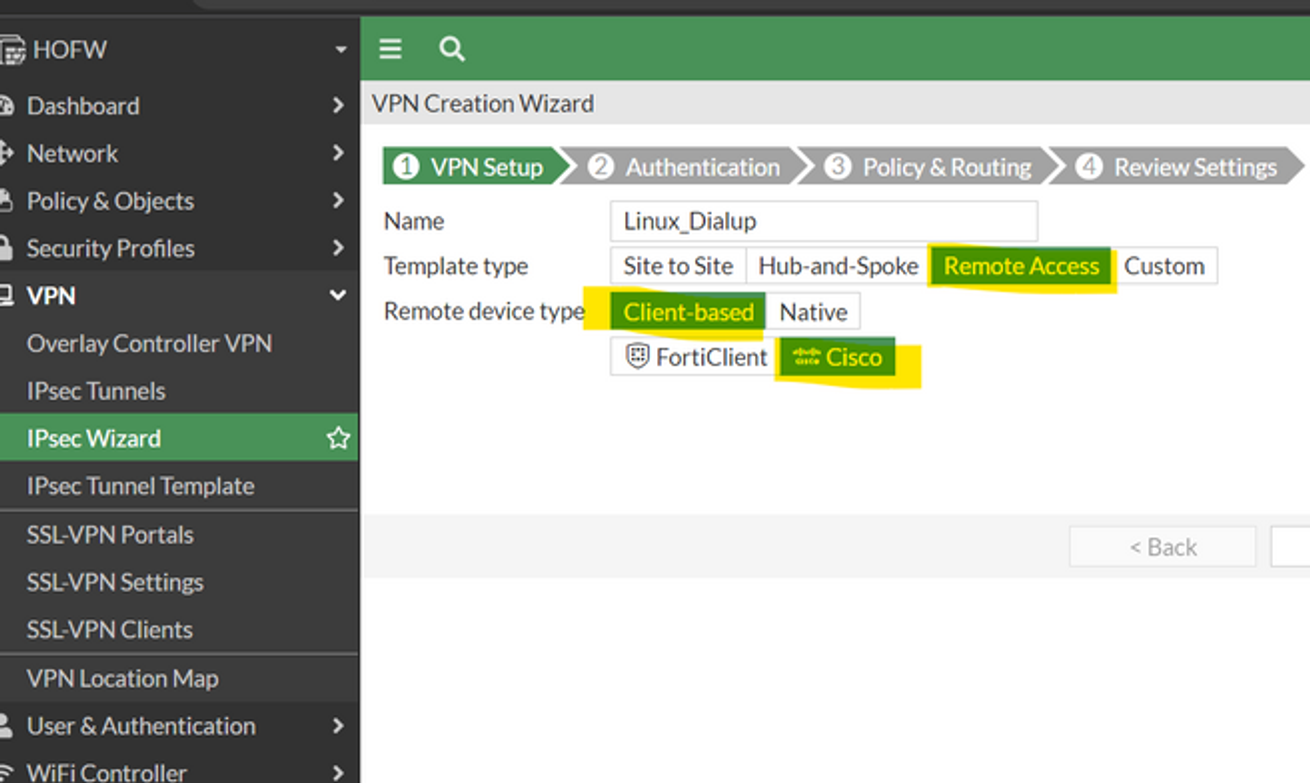
To configure VPN on FortiGate, go to GUI IPsec Wizard -> Template Type: Remote Access -> Remote Device Type: Client-Based, Cisco.
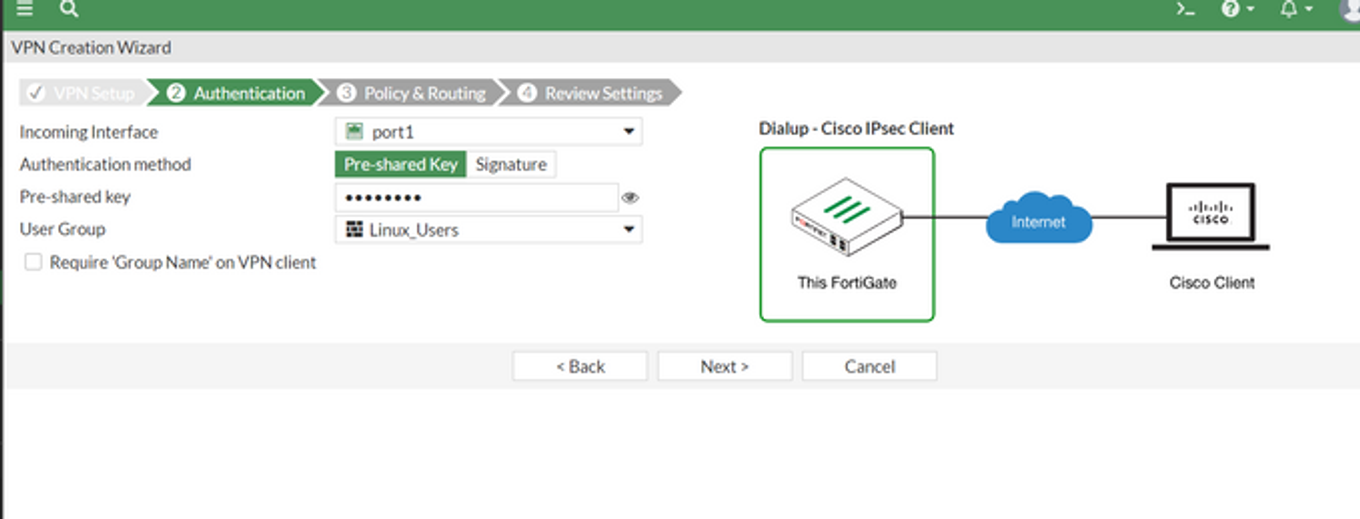
Select the incoming interface, Preshared key, and User group.
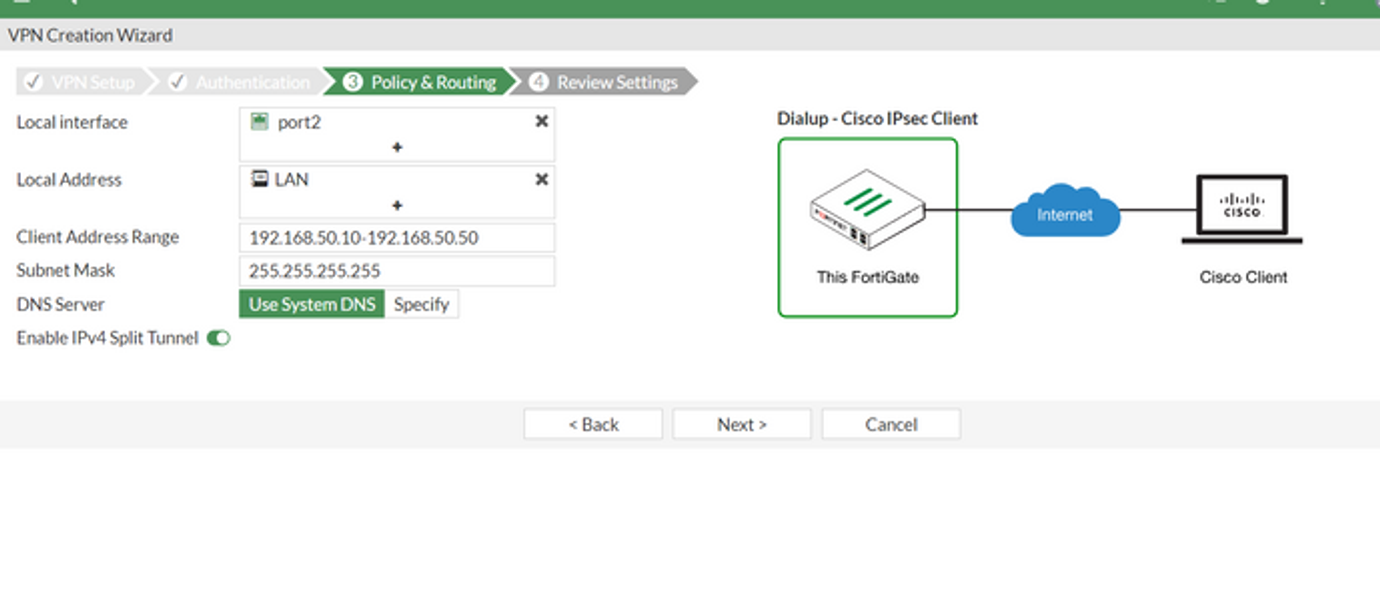
Select the appropriate LAN interface, Subnet, and IP range for VPN.
Configuration on Ubuntu 20.04:
Install Strongswan on Ubuntu using apt package manager.
sudo apt install strongswan
Also, install the below package.
sudo apt install charon-systemd
To Enable the kernel to do packet forwarding edit the /etc/sysctl.conf and uncomment the below lines.
- net.ipv4.ip_forward = 1
- net.ipv6.conf.all.forwarding = 1
- net.ipv4.conf.all.accept_redirects = 0
- net.ipv4.conf.all.send_redirects = 0
To check the status of strongswan service run the below command.
systemctl status strongswan.service
Further strongswan has two files that can be edited to configure VPN.
In this case, we have to configure the below settings:
Fortigate Gateway IP: 113.151.71.99
Tunnel Type Ikev1 Main Mode
Fortigate LAN IP: 172.18.0.0/20
Authentication Type: Preshared Key & Xauth
Preshared Key: skylight
Xauth Username: vpn_pearl_skylight
Xauth Password: skylight
The first file that has to be edited is /etc/ipsec.conf
conn "FTG"
        keyexchange=ikev1
        ikelifetime=1440m
        keylife=60m
        aggressive=no
        ike=aes256-sha256-modp1024
        esp=aes256-sha256
        xauth=client
        left=%defaultroute
        leftsourceip=%config
        leftauth=psk
        rightauth=psk
        leftauth2=xauth
        right=113.161.71.99
        rightsubnet=172.18.0.0/20
        xauth_identity= vpn_pearl_skylight
        auto=start
Another file that has to be edited is /etc/ipsec.secrets with below lines.
113.161.71.99 : PSK "skylight"
vpn_pearl_skylight : XAUTH "skylight"
Once completed, it is necessary to restart the strongswan service with the below commands as root.
sudo systemctl restart strongswan
sudo ipsec update
sudo ipsec reload
To connect the tunnel run the below command as root.
sudo ipsec up FTG
Add route for ubuntu
sudo ip route add 10.10.0.0/21 via 172.18.0.1
Check status ipsec and route
ipsec status
route
To bring down the tunnel use the command.
sudo ipsec down FTG
To see more options for ipsec.conf and ipsec.secrets refer to the man pages in Ubuntu. man ipsec.conf
man ipsec.secrets