Prestage Enrollment
Prestage Enrollment for Mac OS Devices Currently in Use by Users
Prestage Enrollment for Mac OS Devices is a process used primarily in enterprise or educational environments to streamline the setup and deployment of Mac computers.
It allows organizations to pre-configure devices before they are handed out to users, ensuring that each Mac is automatically enrolled in the organization's management system as soon as it is first turned on.
Step 1: Create a Complete Backup Using Time Machine
Refer to the guide: Backup a MacOS | IT Guide
Once the backup is complete, proceed with Erase Mac and Prestage Enrollment.
Refer to the guide: Enrolling a New Mac | IT Guide
Step 2: Restore User Data
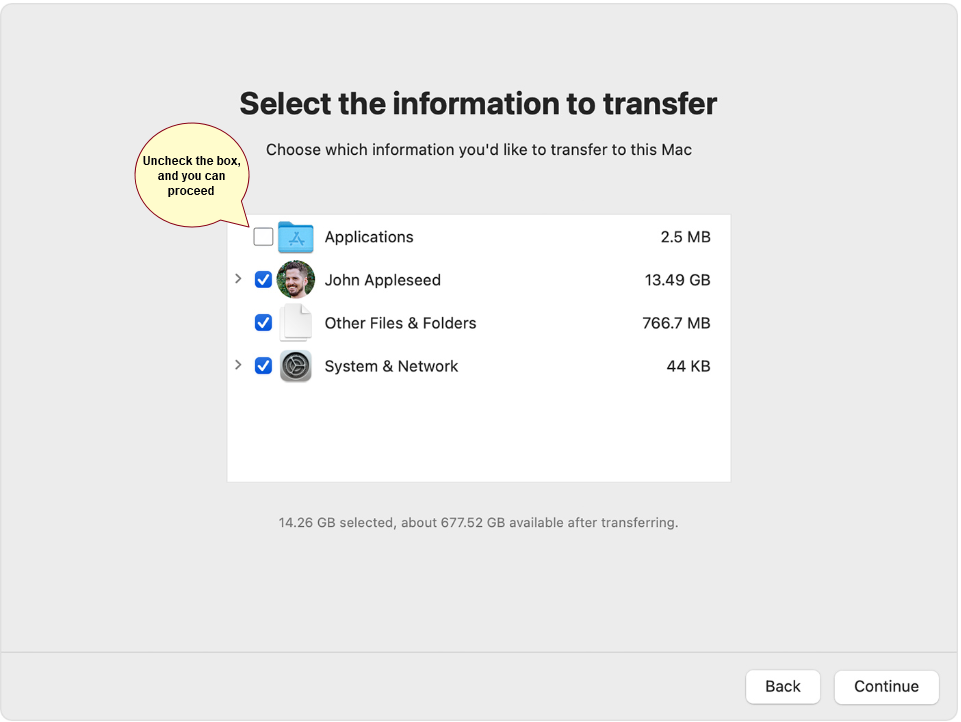
After completing the Prestage Enrollment, restore the user's data using the Migration Assistant application. Follow the guide: Restore a MacOS | IT Guide
Important Note: In Step 7, "Select the information to transfer," make sure to uncheck Applications to avoid potential errors. Once the restore process is complete, reinstall the user's applications to ensure their data is fully restored to its original state.